
New in Gamfi: Personalized Roles in Onboarding

In most organizations, onboarding is a fragmented process - it involves HR, the manager, IT, payroll, compliance, buddies, and the people responsible for training. The trouble is that these tasks are rarely clearly assigned, and accountability gets blurred across departments. The result? Chaos, delays, missing information, an uneven employee experience, and overloaded managers who have to hold the whole thing together by hand. Gamfi solves this problem at the source with a new personalized roles feature.
Personalized roles let you give each person a clear function in the process, divide up the tasks, streamline the flow of information, and build an onboarding "dream team" that runs predictably and efficiently. This doesn't just improve the new hire's experience - it means real time savings, fewer errors, better coordination between departments, and faster time-to-autonomy for the newcomer.
The more complex the organization, the greater the need to bring order to roles. With roles named precisely, everyone knows exactly:
- what they're responsible for,
- when they need to complete their tasks,
- how their work affects the process as a whole,
- and how to work with the other roles involved in the process.
This is the foundation of a modern, scalable onboarding process - especially in companies that hire regularly or at high volume.
That's exactly the need the new option in the Gamfi Onboarding app addresses. Personalized roles is a feature that lets you bring additional people into onboarding and create a comprehensive process where responsibilities are shared evenly, communication flows smoothly, and the new hire is supported on many fronts.
Meet personalized roles in Gamfi Onboarding
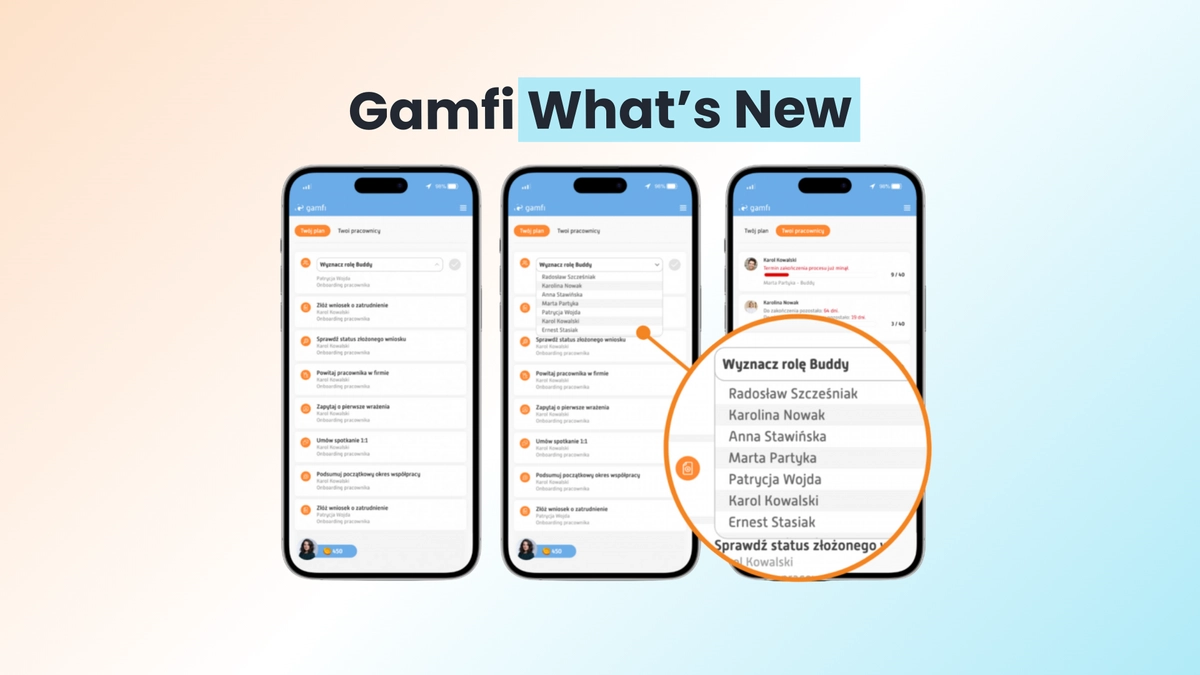
With the new feature, you create an additional role in the process (for example, a buddy, IT support, or payroll), assign a specific person to fill it, then attach it to the new hire and assign concrete tasks. This gives the process administrator and the new hire's manager valuable onboarding support.
In practice, this lifts your company culture to a higher level and indirectly contributes to greater efficiency across individual departments. Assigning personalized roles means everyone knows precisely what task they need to complete in what is undeniably a complex process - onboarding. The overarching goal, of course, remains the best possible introduction of the newcomer to their role. So how do you create and assign personalized roles to the people involved?

Which roles can you bring into the process?
Whichever you like! Or rather - whichever onboarding in your organization needs. The roles are personalized, which means you decide who is involved in onboarding and to what extent. Each person filling a role gets access to their own Gamfi app interface that guides them through the tasks assigned to them.
No more of the misunderstandings that, unfortunately, sometimes mark new-hire onboarding. Roles can cover practically every area of the process, from HR and payroll matters, through training, to informal meetings with a buddy. It's worth adding that this approach also makes it easier to later evaluate how effective onboarding was, and to gauge teamwork between representatives of different departments. The manager and the HR person responsible for onboarding keep their finger on the pulse at all times!
With the personalized roles feature, you can:
- Take operational and administrative tasks off the plate of the manager and HR - because onboarding a new employee goes beyond the remit of HR alone.
- Support the people filling new roles with a handy app and task list, so onboarding runs according to the plan and schedule your organization has adopted.
- Coordinate the work of all roles in a single tool, because modern HR management calls for flawless coordination.
- Care for the new hire in a more comprehensive way, and make it easier to monitor employee satisfaction, since factors tied to poor onboarding are removed from the equation.
All right, but how does it work?
You use the feature in two steps. First you add a new onboarding role, then you designate the employee (or group of employees) who should fill it. That means you can start dividing up roles as soon as the interviews with candidates wrap up. The tool we offer is remarkably flexible and scalable, so every organization can design onboarding its own way. Let's look at both steps.
Adding roles
This stage happens in the admin panel. In the Settings tab, you configure a new role: you give it a name, its own colors, and initials (which will distinguish the role within the process). At this stage you can also indicate a specific person to fill the role (or a pool of potential people).
See how to add a new role in the Gamfi app →
Assigning roles
An HR team member can assign a role to a specific person in the app's admin panel:

A manager can do the same in their employee portal, where they see all the tasks they have to complete in the onboarding process:

See how to assign an employee to a role →
Build an onboarding dream team
Personalized roles is a solution we developed based on years of experience with clients who run exceptionally well-organized onboarding. Thanks to personalized roles, the onboarding process is more complete, and the onboarding team runs like a well-oiled machine. Want to see this solution in action? Give it a try!
Featured blog posts
Discover the most popular posts about employee onboarding and modern HR.


