Gamfi for sales · Module
Commissions calculated automatically, on a plan that steers your sales
Gamfi calculates bonuses and commissions according to your plan, including thresholds, accelerators and split deals. During the period, reps see how much they still need to reach the next rate. You see who in your team is close to a threshold and what the whole period will cost. Controlling closes it without a spreadsheet and sends a ready file to payroll.
They improve their results with us














What Gamfi does differently from a spreadsheet and a standalone commission tool
Most companies calculate commission in a spreadsheet or in an HR system module, and some buy a separate tool on top. Gamfi calculates commission from the same result reps use to track their target and their position in a contest. Targets, rankings and commission are calculated from one sales result, and any difference between them is explained by a specific plan rule.
Usually
One tool calculates commission, another tracks targets and a third runs the contest ranking. Data moves between them by export, and each shows a slightly different number.
In Gamfi
Commission, targets and contests calculated from the same result
Reps see in one place how much they have earned, how far they are from the next threshold and where they stand in the current contest. Commission tools usually do not run contests, and contest tools do not calculate commission.
Usually
HR calculates employed reps, a separate spreadsheet covers B2B contractors, and someone else handles sales partners by their own rules.
In Gamfi
Your whole sales network on one plan
Employees, B2B contractors and external partners are calculated with the same rules or their own, in one place. In the file for HR and accounting, every line has the type of engagement marked.
Usually
Reps learn their commission after the month closes and check it in their own spreadsheet. A discrepancy ends in an email exchange with controlling, and reps remember repeated mistakes when the next job offer comes along.
In Gamfi
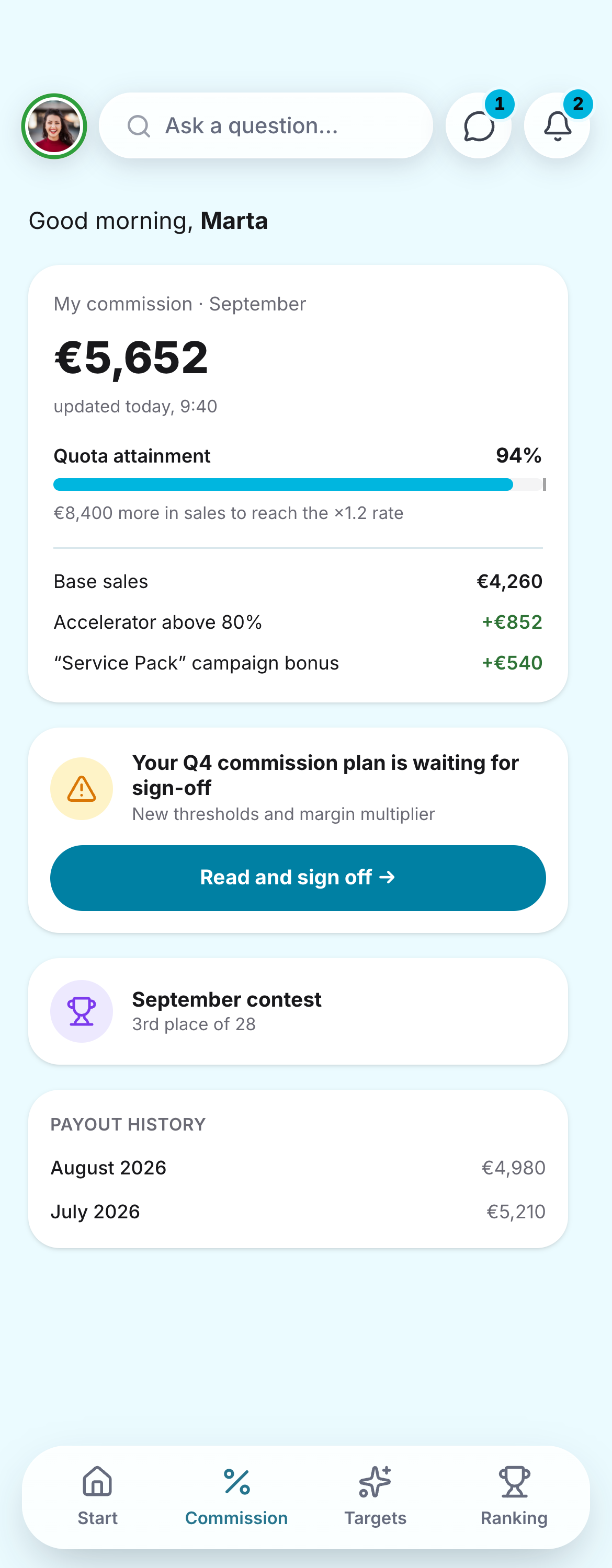
Reps see where an amount came from
During the period they check their commission on their phone and drill down from the amount to the specific deal and rule. They raise a question on that deal and get the answer from the person responsible for it.
The whole network at a glance: who is close to a threshold and what the period costs
A commission plan works when it changes how reps act during the period. In Gamfi you see this while you can still react: quota attainment, commission cost and where a rate change has moved sales.
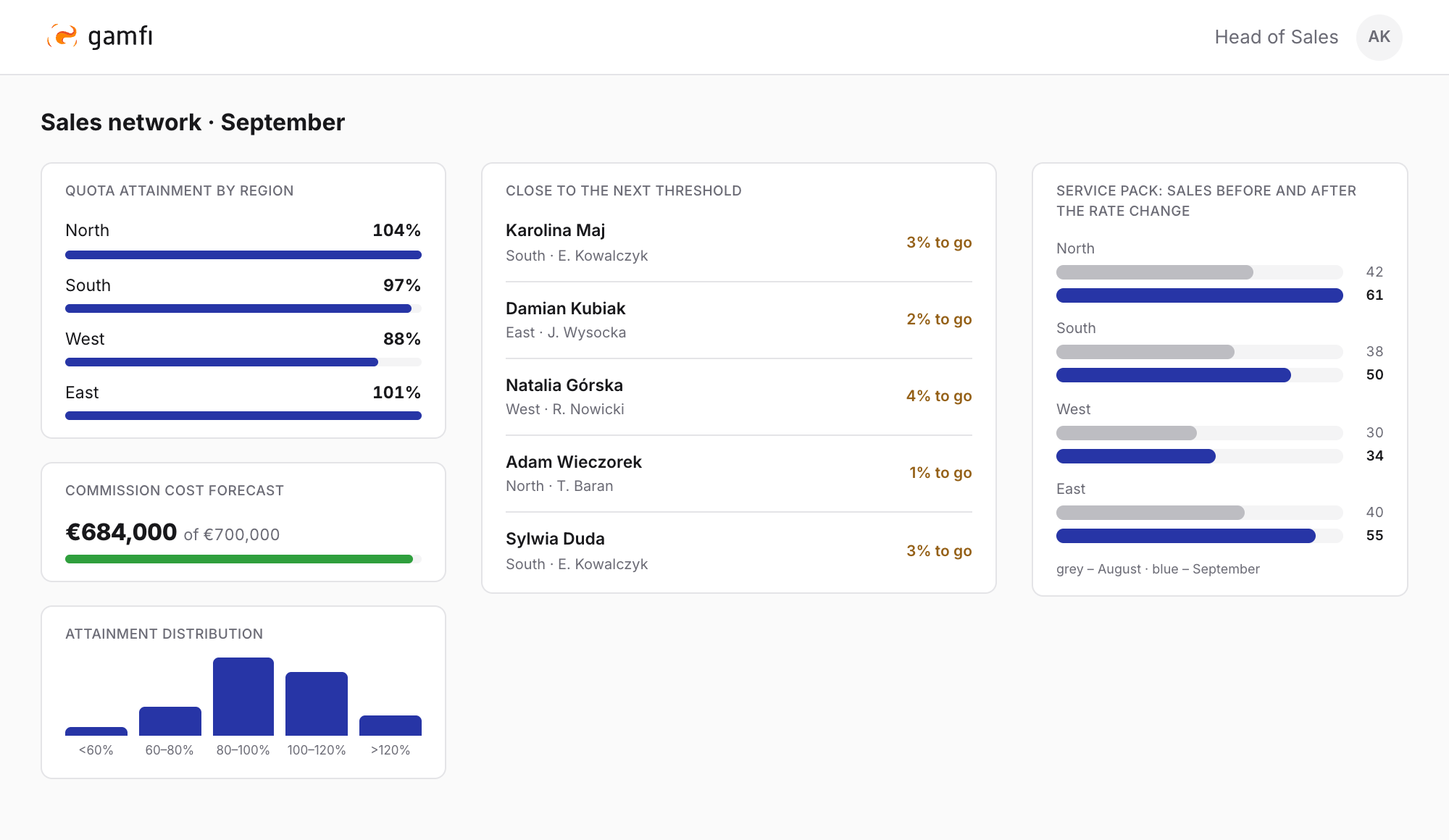
- The list of people a few percent from the next threshold tells regional managers who to talk to this week.
- The commission cost forecast for the end of the period sits next to quota attainment, so the budget holds no surprises at close.
- After a rate change you can see whether product sales really picked up in the regions you cared about.
- The attainment distribution shows whether the whole team earns commission or only the top performers.
From commission plan to payout
Every stage has its owner in Gamfi: controlling sets up the plan, reps check their commission, managers approve their team’s results and a ready file goes to payroll.
Change the plan when the market changes
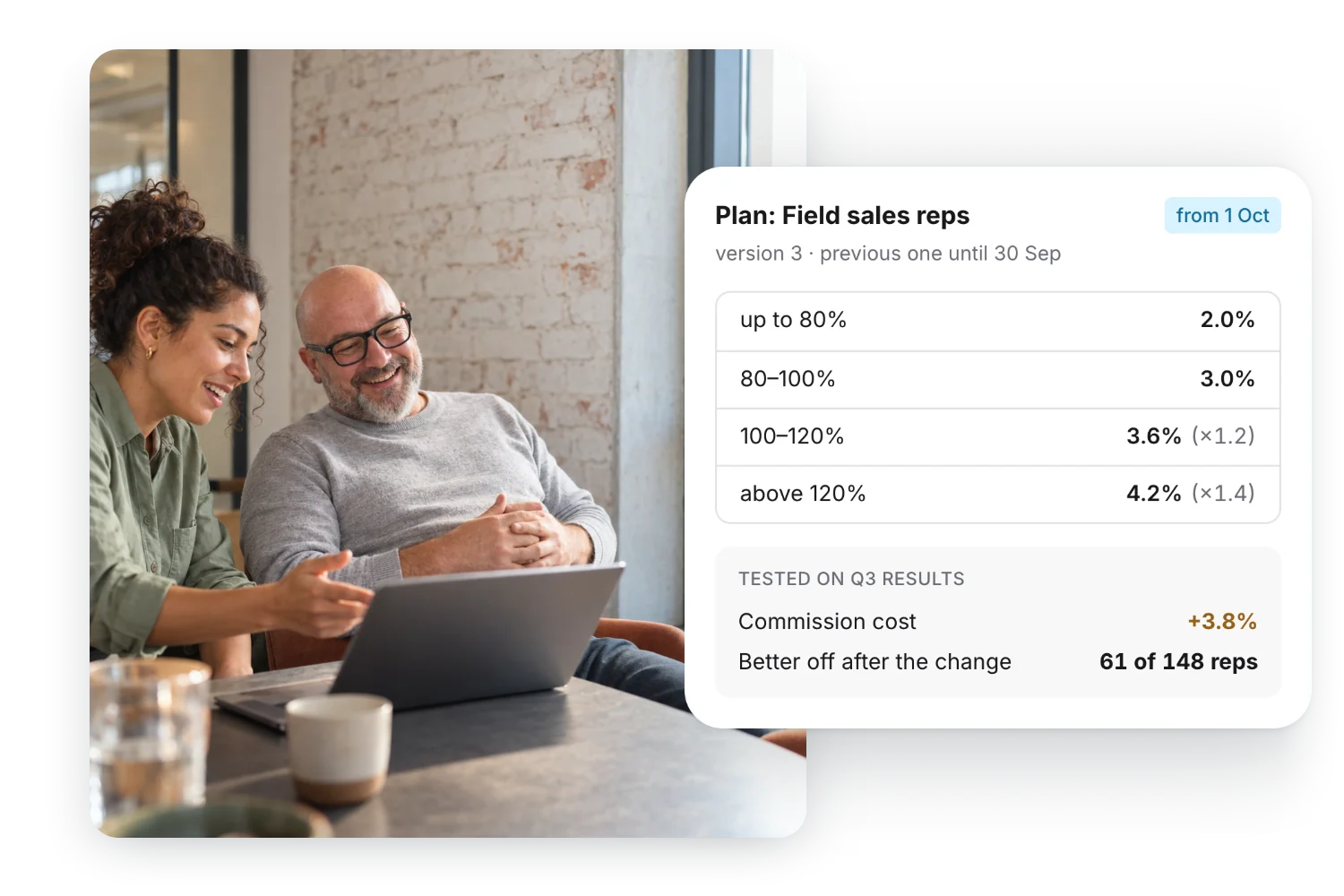
You test a new product rate or a new threshold on past results first: you see what the change will cost and who will gain from it. Then you set the date it takes effect, with no developer and no new spreadsheet version.
- thresholds and accelerators, including a lower rate below a threshold
- multipliers combining product, region, channel and margin
- a campaign bonus alongside the standing plan
- several plans for one person and a guaranteed amount at the start

Everyone who worked on a deal gets their share
Large deals are often closed by several people. Gamfi splits the result in agreed proportions and calculates the manager’s commission on team results.
- splits between reps and roles in the sales process
- manager commission on team results
- employees, B2B contractors and external partners on one plan
- commission reclaimed on returns or unpaid invoices

Reps check what they can earn before they close a deal
Commission updates as sales data comes in. Reps check it on their phone and see what they can earn on the deal they are negotiating right now.
- a statement from amount to deal and rule
- a “what will I earn if…” calculator
- the commission plan to read and sign off in the app
- notifications about every calculation and change
Controlling closes the period without retyping spreadsheets
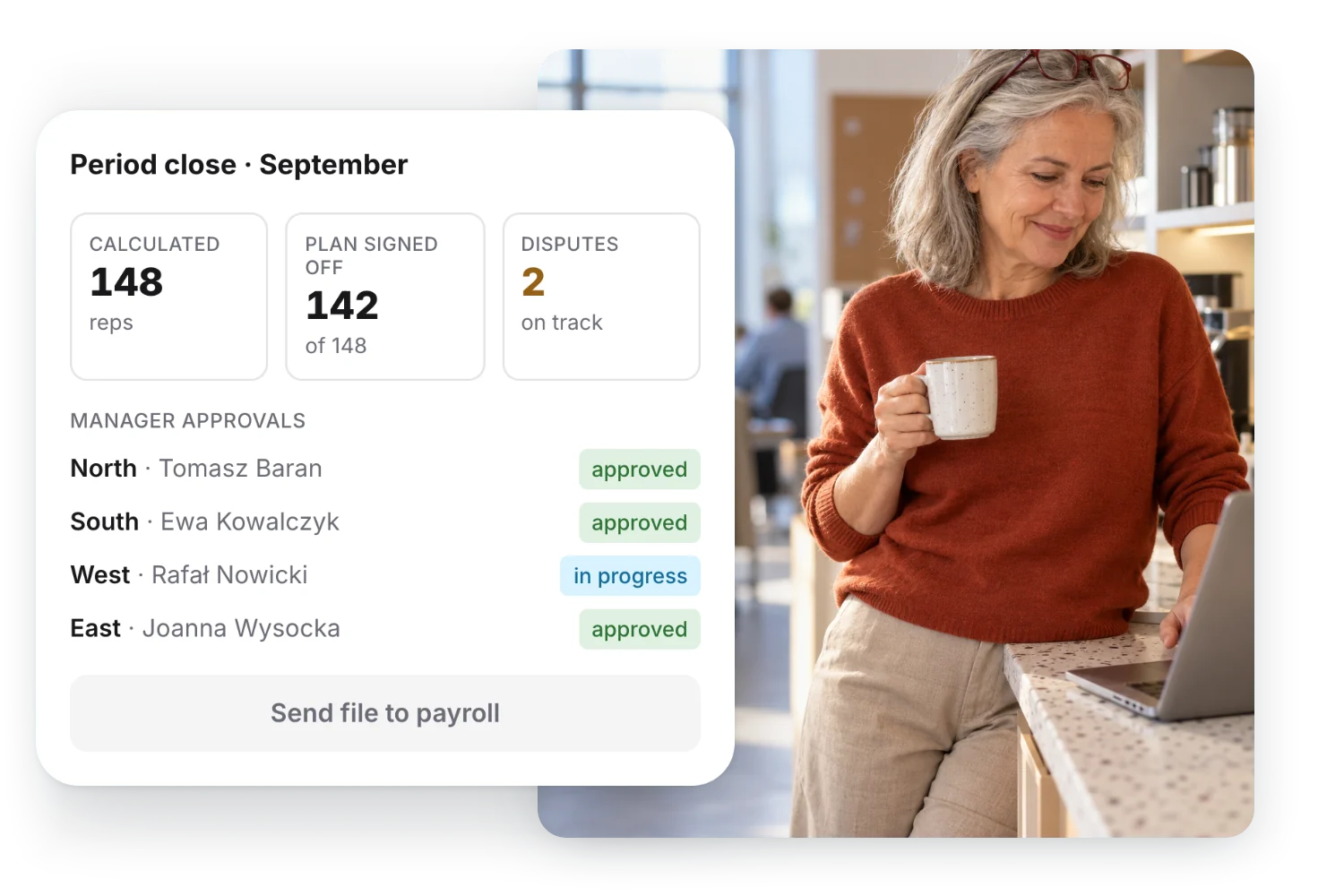
Managers and controlling approve calculations in an agreed order. Open disputes are shown with their owner and deadline, and once everything is approved a ready file goes to payroll.
- multi-level approval of calculations and plan changes
- correcting a closed period by recalculating the difference
- a change log that cannot be edited
- a payroll file or a payout to a card
Describe your need
Describe the situation in your own words – we will write back with how the Gamfi platform answers that challenge. You decide about a meeting in the next step.
What you get in Gamfi
The features sales and controlling ask about when choosing commission software.
Plan and rules
- Rules set up without codingyou describe the plan in Gamfi instead of ordering every change from the vendor
- Thresholds and acceleratorsa higher rate once the next attainment level is reached
- Reduced rate below a thresholdwhen the plan should treat low attainment differently
- Multipliers combining several conditionsproduct, region, channel, customer segment or margin – at once
- Sales campaign bonusa short extra rate on a selected product alongside the standing plan
- Several plans and roles for one personfor example a sales rep plan and a key account plan at the same time
- Guaranteed amount (draw)recoverable or non-recoverable, with a recovery schedule, for people who are ramping up
- Testing a new rule on past resultsyou see the cost of a change before it takes effect
Who gets commission
- Deal split between several sellersin agreed proportions (split credit)
- A share for every role in the sales processthe person who sourced the customer, the sales rep and the account manager, each with their own part
- Manager commission on team resultsa regional manager paid on their people’s results (overrides)
- Employees and B2B contractors in one networkboth groups on the same plan, with the type of engagement marked in the payroll file
- External partners on the same plana distributor or agent calculated with the same rules as your own network
Corrections
- Commission reclaimed on returns or unpaid invoicesdeducted from the next calculation (clawback)
- Your own clawback rules per team and productone protection period for subscriptions, another for one-off sales
- Correcting a closed period with recalculationonly what changed is recalculated, and the history stays
- Recovering an advance on a schedulespread over the following periods, with no manual balance tracking
What reps see
- Current commission on their phoneupdated as data arrives from your systems
- Statement from amount to dealthe rule applied is shown next to every line
- “What will I earn if…” calculatorthe commission on a deal that is still being negotiated
- Distance to the next thresholdhow much is left to reach a higher rate this period
- Commission next to targets and rankingstargets, contests and commission calculated from the same deals
- Notifications about calculations and changesin the app, by email or by text message
Approvals and disputes
- Commission plan sign-off in the appreps read their plan and sign it off on their phone
- Plan sign-off registerwho signed off the plan and when, and who has not done it yet
- Calculation on a new plan only after sign-offthe first calculation waits until the employee signs off the plan
- Multi-level approval of plan changesmanager, controlling and payroll, in the order you set
- Formal period closecompleteness check and approval before payout
- Disputes raised on a specific dealwith an owner, a response deadline and a status
Audit trail, data and payout
- A change log that cannot be editedwho changed a rule, plan or amount, when and what
- Every calculation traceable from deal to payoutfor every amount, including ones from several periods ago
- Plan versions with effective datesa change from the new quarter does not recalculate earlier periods
- Change log exportfor audit and internal control tools
- Sales data via API or filefrom your CRM, ERP or sales system
- Rep accounts created from the HR systemnew people get access and their plan without anyone setting up an account by hand
- Ready file for your payroll systemcolumn layout matched to your system
- Monthly, quarterly and annual payouts in one planfor example commission every month and an annual bonus once a year
- Payout to a prepaid card or walletwhen a bonus needs to arrive outside the payroll cycle
- Multiple currencies and languagesfor networks operating in several countries
Common questions
Open the one that applies to you.
Can we change plan rules without a consultant or developer?
Yes. We will move your current plan into Gamfi together with you during implementation, and further changes – a new threshold, a different rate on a product, a campaign bonus – your own system administrator will make without our help. It is a common problem in this category: with large systems every plan change needs a vendor consultant nobody put in the budget.
How quickly will a rep see a deal in their commission?
As soon as we receive the data from your systems. We will agree the frequency during implementation: it can be several times a day via API or once a day from a file. We do not promise “real time”, because a number that lags behind the sales system quickly loses the team’s trust.
What happens when a rep disputes an amount?
They will raise it on the specific deal in the app, not by emailing controlling. The dispute will go to the person responsible for it, with a response deadline, and the decision will be recorded next to the amount. Disputes cannot be eliminated, but both sides will be looking at the same calculation and the same rule.
Can we correct a period we have already closed?
Yes. The correction recalculates only what changed, and the difference goes into the next calculation or to payroll as a separate file. The reason for the correction is recorded next to the amount and the change log cannot be edited, so an audit shows what was corrected and why.
Will we check the calculation before the first payout?
Yes. We will calculate the first period in parallel with your spreadsheet and compare the results line by line. The first payout based on Gamfi will go ahead once controlling confirms that the numbers match.
Our network has both employees and B2B contractors. Can we calculate them on one plan?
Yes. Both groups can have the same rules or separate ones, and every line in the file for HR and accounting has the type of engagement marked. How it is settled – a bonus on the payroll or an invoice from the contractor – stays with your accounting team, as it does today.
Where will the system get sales data from?
From your CRM, ERP or sales system. We connect Gamfi to it via API, and we will agree the scope of data and the frequency during implementation. Until the connection is live, you can feed the first periods from a file.
Do we have to change our CRM or the way reps report sales?
Your CRM and reporting stay as they are. Gamfi takes the data from them via API or from a file and calculates commission on its side, so reps work as before and get one place where they can see their commission.
When does a spreadsheet stop being enough for commission calculation?
Usually when the plan has more than one threshold, deals are split between several people and the team has dozens of people in several regions. The spreadsheet still calculates correctly, but it does not show where an amount came from, does not remember which plan version applied in a given month, and depends on the one person who knows its formulas.
How much will implementing the Gamfi platform cost?
Several factors affect the price: the number of people on the plan, the scope of modules and the complexity of your commission plan. We give a specific figure after a conversation about your situation – book a meeting and we will work it out together.